
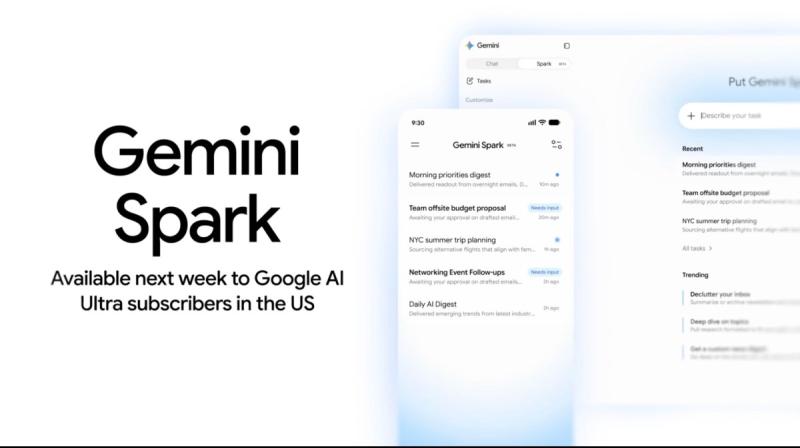

Imagine closing your laptop, turning off your phone, and walking away from your desk while your marketing assistant continues executing complex operational tasks in the background. When Google introduced Gemini Spark to AI Pro and AI Ultra subscribers on July 24, 2026, this scenario ceased to be speculative marketing hype. Spark does not run locally on your physical device; it executes around the clock inside dedicated virtual machines provisioned on Google Cloud.
If you have spent the last two years shrugging at the phrase “AI agent,” your skepticism is well justified. The vast majority of so-called autonomous tools have been little more than reactive chatbots trapped behind a conversational prompt window. Gemini Spark occupies an entirely different category: it interacts directly with your Gmail, Google Calendar, Google Drive, Google Sheets, Google Docs, and external enterprise software to complete multi-step tasks on your behalf.
What exactly is Gemini Spark? How is its cloud architecture engineered? Who has access globally? Which digital marketing workflows can you safely delegate to it, and where does it still fall short?
Below is your comprehensive practitioner’s guide to Google’s 24/7 autonomous AI agent.
What Is Gemini Spark?
Gemini Spark is Google’s personal autonomous AI agent, powered by the multimodal Gemini 3.5 Flash model and hosted within dedicated virtual machines on Google Cloud. Rather than simply responding to prompts, Spark takes high-level user objectives, decomposes them into logical procedural steps, interacts directly with connected applications, and runs continuously in the cloud—even when your computer is shut down.
The critical distinction here lies in the shift from conversational AI to agentic AI.
When you interact with a traditional conversational assistant, you provide an instruction like “Summarize these unread customer emails.” The model generates a textual summary, returns it to your chat window, and halts execution.
With an autonomous agent like Gemini Spark, the interaction model shifts to goal delegation: “Every Monday at 08:00 AM, audit all unread client emails from the previous week, extract open deliverables into a structured table, compile them into a Google Doc, and notify me in Google Tasks.” Spark executes that workflow perpetually, on schedule, without requiring human reminders or active browser sessions.
Traditional Chatbot (Reactive Session)
[ User Prompt ] ───> [ LLM Inference ] ───> [ Text Output ] ───> [ Session Terminates ]

Gemini Spark (Autonomous Cloud Execution)
[ High-Level Goal ] ───> [ Goal Decomposition ] ───> [ Cloud VM Execution (Antigravity) ]
                                                              │
         ┌─────────────────── Tool Calling & MCP ─────────────┴─────────────┐
         ▼                                   ▼                              ▼
  [ Google Workspace ]             [ Third-Party SaaS ]           [ Scheduled Cron Triggers ]
 (Gmail/Sheets/Drive/Docs)         (Canva/Dropbox/APIs)           (Background Persistence)
Google’s rapid deployment of Spark reflects fierce competitive dynamics in the agentic AI landscape. Over the past year, 24/7 personal autonomous AI assistants like OpenClaw captured substantial market share among developers and technical growth teams seeking continuous background execution. Simultaneously, OpenAI rolled out ChatGPT Work and Anthropic expanded Claude Cowork.
Spark represents Google’s strategic counterstrike—leveraging the unmatched competitive moat of its native Google Workspace ecosystem, where billions of knowledge workers already manage their daily operations.
What Sets Spark Apart from Traditional Gemini Features?
Many marketers confuse Gemini Spark with existing capabilities within the Google Gemini interface, such as Deep Research, Canvas, and Gems. However, Spark operates under a fundamentally distinct architectural model.
| Feature / Dimension | Google Gemini (Chat & Canvas) | Gemini Deep Research | Gemini Spark (Autonomous Agent) |
|---|---|---|---|
| Execution Mode | Synchronous, in-session | Multi-step search synthesis | Asynchronous, persistent 24/7 cloud execution |
| Device Dependency | Requires active browser tab | Requires active session | Device-independent (runs on Google Cloud VMs) |
| Action Authority | Read & generate text only | Web research and document compilation | Executes live actions (modifies files, schedules events, triggers APIs) |
| Application Reach | Text interface only | Web search retrieval | Native Google Workspace + Third-party SaaS (via MCP) |
| Concurrency | Single interactive thread | Single background report | Up to 15 parallel autonomous tasks simultaneously |
| Underlying Engine | Gemini 1.5 / Pro | Gemini 1.5 Pro | Gemini 3.5 Flash on Antigravity infrastructure |
The first core difference is temporal persistence. In Deep Research or Canvas, processing occurs during an active user session. If you close your browser or shut your laptop, execution freezes or terminates. Spark operates inside dedicated cloud containers; you assign a task and disconnect, and the agent continues its work uninterrupted.
The second difference is operational authority. While Deep Research queries the public web to compile whitepapers, Spark possesses write permissions across your digital ecosystem. It can update a Google Sheet, create presentation slides in Google Slides, stage design drafts in Canva, make dining reservations, or move invoices into designated Drive directories.
The third difference is concurrency. Spark can execute up to 15 parallel tasks simultaneously, distributing workloads across its allocated cloud compute resources.
How Gemini Spark Works: The Tri-Pillar Architecture
To deploy Gemini Spark effectively within digital marketing operations, you must understand its three foundational building blocks: Tasks, Skills, and Schedules.
                           ┌───────────────────────────┐
                           │    HIGH-LEVEL OBJECTIVE   │
                           └─────────────┬─────────────┘
                                         │
                 ┌───────────────────────┼───────────────────────┐
                 ▼                       ▼                       ▼
        ┌─────────────────┐     ┌─────────────────┐     ┌─────────────────┐
        │   1. TASKS      │     │   2. SKILLS     │     │  3. SCHEDULES   │
        │ Dynamic Units   │     │ Persistent SOPs │     │ Event & Cron    │
        │ of Work         │     │ & Rulesets      │     │ Triggers        │
        └────────┬────────┘     └────────┬────────┘     └────────┬────────┘
                 │                       │                       │
                 └───────────────────────┼───────────────────────┘
                                         ▼
                        ┌─────────────────────────────────┐
                        │   GOOGLE CLOUD VIRTUAL MACHINE  │
                        │    (Antigravity Infrastructure) │
                        └─────────────────────────────────┘
1. Tasks (Dynamic Execution Units)
Every ad-hoc assignment given to Spark manifests as a Task. Through the dedicated Spark task dashboard, users can monitor execution milestones in real time, review which application APIs or tools the agent is interacting with, inspect intermediate drafts, and receive alerts upon completion.
2. Skills (Persistent Procedural SOPs)
Skills are permanent operational rulesets defined for recurring processes. Think of a Skill as a Standard Operating Procedure (SOP) written in natural language that Spark memorizes:
“On the first day of every month, scan my Google Drive ‘Invoices’ folder, parse all incoming PDF billing statements, record vendor name, date, and net amount into the ‘2026 Marketing OpEx’ Google Sheet, and create a draft payment summary in Google Docs.”
Once a Skill is established, you do not need to repeat instructions. The agent stores the workflow logic and executes it whenever triggered. (Note: At present, custom Skill definitions must be configured in English for maximum semantic precision.)
3. Schedules (Event-Driven and Temporal Triggers)
Schedules dictate when and under what conditions Tasks and Skills fire. Spark supports both cron-based temporal schedules (e.g., “Every Tuesday at 09:00 AM EST”) and condition-based event triggers (e.g., “Whenever a designated competitor publishes a new press release” or “When ad spend metrics breach a specific threshold”).
The Cloud Backend: Antigravity Infrastructure
Under the hood, Spark does not rely on local browser automation or fragile headless scrapers running on your machine. Instead, each user account is allocated dedicated virtualized compute containers on Google Cloud, built upon Google’s developer infrastructure codenamed Antigravity.
This cloud-native virtualization means your machine can be powered off or disconnected from the internet without interrupting active workflows. However, execution capacity is tied directly to your subscription’s Gemini compute quota—meaning agentic runs are not infinite and must be managed strategically.
Security, Permissions, and Governance: Can You Trust an Agent with Your Data?
Granting an autonomous AI agent read-and-write permissions across your Gmail inbox, Google Drive repositories, and project management databases introduces legitimate enterprise security, privacy, and compliance questions.
                           [ AGENT PROPOSED ACTION ]
                                       │
                    Is the action reversible & low-risk?
                                       │
                     ┌─────────────────┴─────────────────┐
                     │                                   │
                  [ YES ]                              [ NO ]
                     │                                   │
            (Auto-Execution)                 (High-Impact Transaction)
          - Read document                  - Send external email
          - Aggregate analytics            - Authorize financial payment
          - Draft presentation             - Delete/overwrite critical files
                     │                                   │
                     ▼                                   ▼
            [ TASK COMPLETED ]               [ HUMAN APPROVAL REQUIRED ]
                                             (Explicit User Confirmation)
Google addresses these risks through three primary containment layers:
- Human-in-the-Loop (HITL) Confirmation Gates: Google prevents Spark from executing irreversible or high-stakes actions autonomously. For financial transactions, third-party payments, and sending external communications to new recipients, Spark halts execution and prompts the user for explicit confirmation before proceeding.
- Granular Scoped Permissions: Spark cannot access arbitrary applications by default. Users must explicitly authenticate and authorize each individual connector (e.g., Drive, Calendar, Canva). You maintain full visibility to revoke service tokens at any time.
- Data Privacy and Regulatory Scrutiny: For marketing agencies and corporate enterprises managing sensitive customer data, granting third-party LLMs full access to email threads and shared drives requires careful compliance auditing. Before integrating autonomous agents into active client workflows, ensure your operating procedures adhere to our GDPR and data privacy compliance framework.
[!IMPORTANT]
Prepare your data hygiene before delegating workflows. Introducing autonomous agents into chaotic, unorganized data structures amplifies errors. Review our comprehensive marketing automation strategy guide to audit which workflows are ripe for delegation and which require strict human intervention.
Ecosystem & Integrations: Google Workspace Meets the Model Context Protocol (MCP)
Gemini Spark’s enterprise value is determined less by the raw parameter count of Gemini 3.5 Flash and far more by the breadth and depth of its integration ecosystem.
Native Google Workspace Integration
Spark natively interfaces with core Google platforms:
* Productivity: Gmail, Google Calendar, Google Drive, Google Docs, Google Sheets, Google Slides, Google Keep, Google Tasks
* Media & Navigation: YouTube, Google Maps
Third-Party SaaS Connectors
Following its major platform update on June 30, 2026, Google unlocked verified third-party application connectors, enabling Spark to orchestrate workflows across external platforms:
* Design & Creative: Canva
* Cloud Storage: Dropbox
* Commerce & Lifestyle: Instacart, OpenTable, Zillow Rentals
The Power of the Model Context Protocol (MCP)
Crucially, these third-party connections are not built exclusively through proprietary, closed Google APIs. They leverage the Model Context Protocol (MCP), an open architectural standard designed to connect AI models directly to external data sources and execution environments.
Because Google has adopted MCP, Spark’s integration ecosystem will not be bottlenecked by Google’s internal development sprints. Any SaaS provider, developer, or enterprise IT team can configure an MCP server to expose internal databases, CRMs, or proprietary tools to Spark. Understanding how Model Context Protocol (MCP) servers connect AI agents to live enterprise data is essential for marketing teams planning multi-year AI roadmaps.
Intelligent Real-Time Topic Tracking
Beyond static file management, Spark features active Topic Tracking. The agent continuously monitors public web properties, industry news portals, financial markets, and RSS feeds against defined keyword parameters.
While legacy tools like Google Alerts simply push a list of links to your inbox, Spark reads the content, performs semantic analysis, summarizes key takeaways, and updates a collaborative briefing document automatically.
Global Availability, Pricing, and Access Criteria
Google rolled out Gemini Spark through a phased deployment schedule beginning in mid-2026:
Rollout Timeline
| Date | Deployment Milestone |
|---|---|
| May 2026 | Official unveiling at Google I/O 2026 |
| June 2026 | Closed beta access for US Google AI Ultra subscribers |
| June 30, 2026 | Release of MCP third-party integrations and macOS desktop client |
| July 16, 2026 | Phased international expansion for AI Ultra users across early-access regions |
| July 24, 2026 | Broad availability expanded to Google AI Pro subscribers |
Regional Availability Dynamics
Google’s phased rollout prioritized select global markets while temporarily holding back deployment across the European Economic Area (EEA), the United Kingdom, Switzerland, and Nigeria pending regional AI regulatory approvals. Users outside the EEA—including North America and early-access global markets—received operational access significantly earlier than their European counterparts, creating a valuable window for early operational mastery.
Technical Access Requirements
To access Gemini Spark, accounts must satisfy four criteria:
1. Account Type: Personal Google Account (corporate Google Workspace enterprise domains remain unsupported in the initial release).
2. Subscription Tier: Active Google AI Ultra or Google AI Pro plan.
3. Account Settings: Web & App Activity history must be toggled ON in Google account privacy settings.
4. Age Restriction: Account owner must be 18 years of age or older.
Pricing Structure & ROI Calculus
Alongside Spark’s launch, Google overhauled its AI subscription pricing to drive mass agent adoption:
* Google AI Ultra (Full Tier): Reduced from \$250/month to \$200/month.
* Google AI Ultra (Entry Tier): Introduced at \$100/month for lighter compute needs.
* Google AI Pro: Available at \$20/month, dramatically lowering the barrier to entry for solo operators and small teams.
Freelancer / Small Agency ROI Formula
Weekly Manual Operational Tasks:       6 Hours
Monthly Time Saved via Spark:          24 Hours
Average Billing Rate:                  $60 / Hour
Gross Monthly Value Generated:         $1,440
Google AI Subscription Cost:           -$20 to -$100 / Month
─────────────────────────────────────────────────────────────
Net Monthly Operational ROI:           +$1,340 to +$1,420
If delegating data aggregation, file formatting, and inbox triage saves your team even 6 hours per week, you reclaim 24 hours of high-value strategic capacity each month—making the subscription commercially viable from month one.
5 Practical Digital Marketing Use Cases for Gemini Spark
How does Gemini Spark translate into practical day-to-day digital marketing efficiency? Here are five battle-tested operational scenarios:
1. Automated Weekly Performance Reporting
For digital marketing leads, Monday mornings are often dominated by tedious reporting rituals: logging into Google Analytics 4, extracting keyword ranking shifts from Google Search Console, recording ad spend across paid media channels, and manually pasting numbers into a client deck.
How Spark Automates It:
Define a recurring Skill in Spark:
“Every Monday at 08:00 AM, access the ‘Weekly Performance Reporting’ template in Google Slides, extract traffic and conversion figures from the linked Google Sheets repository, calculate week-over-week variance percentages, and stage a draft presentation complete with bulleted performance highlights.”
Instead of spending 2.5 hours compiling raw metrics, the marketing lead spends 15 minutes reviewing the generated slides, adding executive commentary, and presenting actionable insights.
2. Continuous Competitor Intelligence & SERP Monitoring
Manually tracking competitor product launches, blog content, and pricing updates across dozens of websites is time-consuming and prone to gaps.
How Spark Automates It:
Using its Topic Tracking capabilities, Spark monitors target competitor domains and press feeds. Whenever a competitor publishes new content or updates their core offerings, Spark extracts the key themes, evaluates their positioning angle, and appends the intelligence directly to your shared research document. This intelligence directly fuels your ongoing SEO competitor analysis, keeping your content strategy ahead of industry shifts.
3. Content Pipeline Operations & Asset Staging
The most time-draining aspect of content marketing is often not the writing itself, but the operational coordination: updating editorial calendars in Google Sheets, generating standard writer briefs in Docs, creating graphic placeholder assets in Canva, and verifying staging checklists.
How Spark Automates It:
Spark can coordinate the entire pipeline. Once you designate target topics, the agent creates standardized outline documents, populates editorial calendar rows with target publication dates, stages initial social graphic dimensions in Canva via MCP, and assigns calendar deadlines in Google Tasks. The human strategist retains full creative authority, while the agent handles logistics.
4. Client Request Triage & Inbox Management
For marketing agencies, account inboxes can quickly become operational bottlenecks, with critical client requests buried under newsletters and routine notifications.
How Spark Automates It:
Spark can scan incoming Gmail messages, categorize emails by urgency, identify unfulfilled deliverables approaching their deadlines, and compile an unread client request summary in Google Tasks. Account managers start their workday with a prioritized checklist rather than an overwhelming inbox.
5. SaaS Tool & Marketing OpEx Audit
Marketing departments frequently suffer from “subscription bloat”—paying monthly fees for forgotten analytics tools, design software, and automation plugins.
How Spark Automates It:
Spark can audit expense sheets, receipts, and billing notifications in Drive to flag recurring software subscriptions, identify unused seats, and highlight duplicate tooling. Uncovering just two forgotten \$50/month SaaS subscriptions immediately offsets your agent infrastructure costs.
[!TIP]
Measure before you automate. Autonomous agents should only be deployed where time savings translate into clear operational dividends. Use our strategic roadmap for maximizing digital marketing ROI to track performance metrics across all automated initiatives.
Gemini Spark vs. OpenClaw vs. ChatGPT Work & Claude Cowork
The agentic AI landscape in 2026 offers distinct architectural approaches. Understanding how Spark compares to leading alternatives ensures you choose the right tool for your specific operational constraints.
                          AGENT ARCHITECTURE SPECTRUM

       [ OpenClaw ]                [ Claude Cowork /        [ Gemini Spark ]
                                    ChatGPT Work ]
 ┌──────────────────────┐      ┌──────────────────────┐  ┌──────────────────────┐
 │ • Self-Hosted Docker │      │ • Provider Cloud     │  │ • Managed Google VM  │
 │ • Fully Agnostic     │      │ • Proprietary Stack  │  │ • Native Workspace   │
 │ • Technical Setup    │      │ • Subscription-Based │  │ • Zero Config Setup  │
 │ • Maximum Privacy    │      │ • Balanced Ecosystem │  │ • MCP Extensible     │
 └──────────────────────┘      └──────────────────────┘  └──────────────────────┘
   HIGH CUSTOMIZATION               BALANCED TIER           ZERO-FRICTION ADOPTION
Head-to-Head Comparison Matrix
| Evaluation Criterion | Gemini Spark | OpenClaw | ChatGPT Work / Claude Cowork |
|---|---|---|---|
| Hosting Model | Fully managed Google Cloud VMs | Primarily self-hosted (Docker/VPS) | Provider-managed cloud infrastructure |
| Ecosystem Native | Deep native Google Workspace | Completely platform-agnostic | Proprietary ecosystem integrations |
| Setup Complexity | Zero configuration (turnkey subscription) | High (requires CLI, API keys, servers) | Low (turnkey subscription) |
| Data Sovereignty | Data processed in Google Cloud | 100% user-owned (on-premise/private cloud) | Data processed in provider cloud |
| Extensibility | Verified MCP integrations | Unlimited open-source customization | Pre-built partner connectors & plugins |
| Cost Structure | Included in AI Pro (\$20) / AI Ultra (\$100-\$200) | Infrastructure compute + direct API fees | Enterprise seat subscriptions |
| Parallel Execution | Up to 15 concurrent tasks | Limited only by server hardware | Plan-dependent concurrency limits |
The Gemini Spark Advantage: Unmatched zero-friction adoption. If your marketing organization runs on Gmail, Google Drive, and Google Docs, Spark connects instantly without requiring server maintenance, Python scripts, or complex API routing.
The OpenClaw Advantage: Total data sovereignty and unlimited flexibility. For organizations handling restricted healthcare, financial, or confidential enterprise data that cannot reside in a public cloud, open-source self-hosted agents like OpenClaw remain the gold standard.
The Broader Search Engine Implication
The rise of autonomous agents is simultaneously disrupting organic search behavior. When AI agents—rather than human users—retrieve and synthesize information, content architecture must be structured for machine readability. If your organic strategy has not accounted for how Google AI Mode and AI Overviews reshape search visibility, your brand risks becoming invisible to the next generation of autonomous search agents.
Limitations, Edge Cases, and Operational Pitfalls
While Gemini Spark represents a breakthrough in cloud productivity, practical deployment reveals several real-world limitations that teams must navigate:
                              OPERATIONAL RISK AUDIT

   ┌───────────────────────────┬───────────────────────────┬───────────────────────────┐
   │    LANGUAGE FRICTION      │   ENTERPRISE EXCLUSION    │    VERIFICATION BURDEN    │
   │                           │                           │                           │
   │ Custom Skills currently   │ Corporate Workspace       │ Silent failure modes:     │
   │ require English syntax    │ accounts cannot access    │ humans must audit data    │
   │ for reliable execution.   │ Spark in initial rollout. │ tables before publishing. │
   └───────────────────────────┴───────────────────────────┴───────────────────────────┘
- Skills Require English Syntax: While Spark can parse multilingual inputs and draft text in dozens of languages, formulating persistent custom Skills requires structured English commands. Multilingual marketing teams must maintain their operational SOP library in English.
- Corporate Workspace Accounts Excluded: As of its initial launch, Spark is restricted to personal Google accounts. Marketing agencies and corporate enterprises operating on managed
@company.comGoogle Workspace domains cannot access Spark directly on enterprise accounts. - Hard Compute Rate Limits: Although Spark supports 15 concurrent tasks, execution draws against your overall Google Gemini compute quota. Heavy daily automation runs can throttle processing speeds during peak hours.
- Silent Failure Modes & Hallucination Risks: Unlike traditional software that throws explicit error codes when broken, an LLM agent may misinterpret a complex spreadsheet table or misclassify an email without raising an error. The burden of verification remains entirely on the human operator. Sending an unverified, agent-generated report directly to an enterprise client without review introduces severe reputational risk.
Step-by-Step Implementation Guide: Getting Started with Gemini Spark
If you have an active Google AI subscription and access to Spark, follow this disciplined 6-step implementation framework:
[ Step 1: Access Portal ] ───> [ Step 2: Low-Risk Connectors ] ───> [ Step 3: Single Task ]
                                                                             │
[ Step 6: Automate Cron ] <─── [ Step 5: Define First Skill ] <─── [ Step 4: Audit Output ]
Step 1: Access the Spark Environment
Navigate to gemini.google.com using your eligible personal Google account and select the Spark tab in the top navigation panel. If you work on macOS, download the official desktop application (gemini.google/mac) for native desktop integration.
Step 2: Connect Low-Risk Applications First
Do not connect your primary Gmail inbox on Day 1. Begin by authorizing low-risk sandbox environments: Google Calendar and a dedicated Google Drive folder. Observe how the agent reads, interprets, and manipulates files in an isolated environment before expanding permissions.
Step 3: Assign a Deterministic Validation Task
Start with a task that has unambiguous, easily verified criteria:
“Review my Google Calendar for the upcoming work week, extract all meetings with external attendees, and generate a bulleted list of potential scheduling conflicts in Google Docs.”
Step 4: Manually Audit Intermediate Outputs
Review the agent’s step-by-step task execution log. Did it misread time zones? Did it misunderstand recurring events? Calculate the agent’s baseline accuracy across its first five runs before trusting it with complex assignments.
Step 5: Author Your First Persistent Skill
Select a routine operational process that your team executes at least three times per week. Draft a clear, unambiguous Skill in English outlining exact trigger conditions, input locations, transformation rules, and output destinations.
Step 6: Enable Automated Schedules
Only enable automatic time-based triggers (e.g., daily 08:00 AM runs) after a Skill has achieved a 95%+ success rate across manual test runs.
[!WARNING]
Avoid the “Everything, Everywhere, All at Once” trap. The most common failure mode for agency leaders is attempting to automate eight complex workflows simultaneously on Day 1. Within 48 hours, broken runs and misconfigured rules lead to frustration and abandonment. Start with a single reporting workflow, master its operational cadence, and scale incrementally.
Frequently Asked Questions (FAQ)
Is Gemini Spark free to use?
No. Access to Gemini Spark requires an active paid subscription to Google AI Pro (\$20/month) or Google AI Ultra (\$100–\$200/month). Free-tier Google Gemini accounts and entry-level Google One storage plans do not include access to the Spark autonomous agent environment.
Does Gemini Spark support languages other than English?
Yes, for conversational tasks and content generation. You can assign tasks in various languages, and Spark will read and generate multilingual content. However, defining persistent Skills (recurring procedural rulesets) currently requires English prompt formulation to prevent execution errors.
Does Gemini Spark continue running when my computer is turned off?
Yes. Spark runs on dedicated virtual machines provisioned on Google Cloud using Google’s Antigravity developer architecture. Once a task or scheduled skill is initiated, you can close your browser and shut down your physical hardware; Spark completes the workload in the cloud and logs the final output to your account.
What is the primary difference between Gemini Spark and ChatGPT?
Standard ChatGPT functions as a conversational session: you submit a prompt, it generates a response, and the interaction closes. Gemini Spark operates as an autonomous agent: it takes high-level goals, creates sequential multi-step execution plans, manipulates connected applications (Docs, Sheets, Canva, etc.), and runs continuously on automated schedules without human supervision. OpenAI’s direct counterpart is ChatGPT Work, while Anthropic offers Claude Cowork.
How does Google protect my private data in Gemini Spark?
Google enforces explicit confirmation checkpoints for irreversible or sensitive actions (such as authorizing financial transactions or sending external emails). Furthermore, users maintain granular control over which applications are connected and can revoke access tokens at any time. However, because enterprise Workspace accounts are not yet supported, all usage currently occurs under personal Google account data terms.
How many tasks can Gemini Spark run simultaneously?
Gemini Spark can execute up to 15 parallel tasks at the same time. If additional workloads are assigned beyond this limit, they are queued sequentially. Keep in mind that overall throughput is constrained by your account’s monthly Gemini compute quota.
The Autonomous Era Is Here: What Is Your Next Move?
With Gemini Spark, digital marketing operations are fundamentally shifting: we are moving away from prompting AI to delegating work.
                            SUMMARY SCORECARD: GEMINI SPARK

  CORE ENGINE:          Gemini 3.5 Flash running on Google Cloud VMs (Antigravity)
  PRIMARY OPERATING TRIO: Tasks (Work units), Skills (SOPs), Schedules (Triggers)
  CONCURRENCY LIMIT:    Up to 15 simultaneous parallel background tasks
  ELIGIBILITY:          Google AI Pro / Ultra subscribers (Personal accounts, 18+)
  GREATEST STRENGTH:    Frictionless native Google Workspace & MCP integration
  PRIMARY LIMITATION:   English-only Skills syntax; enterprise Workspace accounts excluded
For digital marketing leaders, agency founders, and growth professionals outside heavily restricted regulatory zones, an unprecedented operational window has opened. While many enterprise organizations remain sidelined due to regulatory delays or software rollout schedules, proactive marketers can master autonomous agent delegation today.
Your Action Plan This Week:
1. Take a notepad and document the three most repetitive operational tasks your team performed over the last five business days.
2. Select the single task that features the most structured inputs and predictable outputs (such as weekly reporting compilation or inbox deliverable triage).
3. Build and test that single workflow in Gemini Spark.
Master one recurring pipeline first. Autonomous marketing maturity is built one reliable workflow at a time.
For more technical breakdowns and actionable strategic frameworks on integrating generative technology into your growth stack, explore our complete library of AI in digital marketing resources.